Hardware Case Study
Important
This article is a superficial description of the actual hardware. I have intentionally left out some complex parts which are a bit overwhelming and out of the scope of this / previous articles. Ofcourse the article is not the exact depiction of the real-world system, but it takes you one step closer.
In recent weeks we have talked a lot about CPU, cache, registers, and memory hierarchy. Let's take a detour for one blog and actually examine the actual hardware components corresponding to these in your actual computer.
The cache structure shown in this article is from Intel® Core™ i5-9300H CPU @ 2.40GHz which is a fairly modern processor. It has 4 physical cores, and 8 virtual cores.
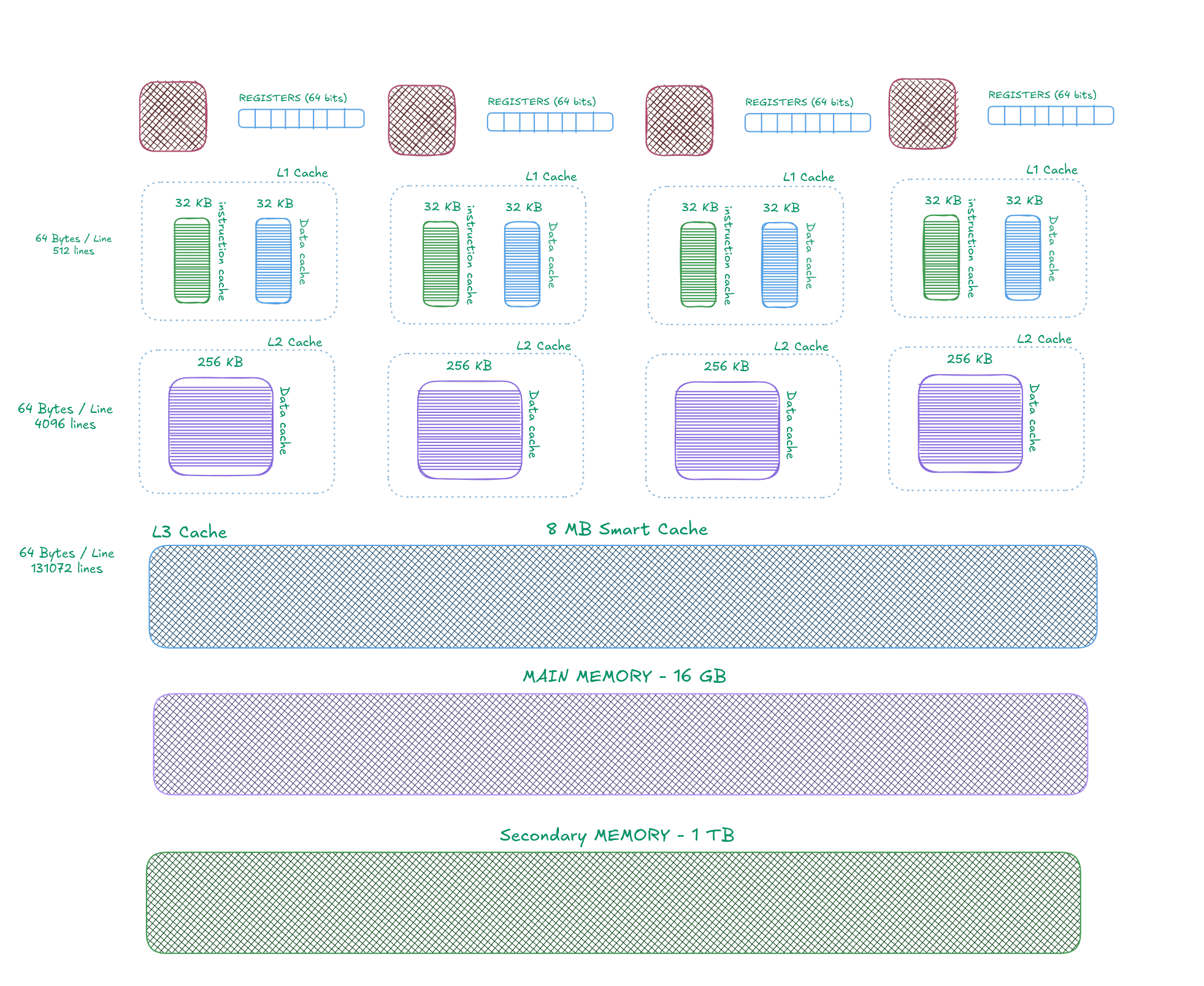
Here's a diagram of the Memory Hierarchy with size specifications. I recommend you to keep this image open on the side while reading this article.
Overview
There are 6 data storage devices in this system -
- Registers
- Level 1 cache
- Level 2 cache
- Level 3 cache
- Main Memory
- Secondary Memory
Before you turn ON your computer, the top 5 of these are empty. All the data is stored inside secondary memory, which is able to persist data even when electricity supply is cut. When the computer is booted / turned ON, the cpu starts to populate the storage devices closer to it.
Keep in mind, the higher in the hierarchy a storage device is, the costlier and faster it is. Which is also why, the cache sizes get smaller and smaller as we go upwards.
There are mainly two types of information that CPU may ask for - Data and Instructions. These terms are used quite interchangeably in this article.
Reading From the Memory
When we execute the program using our command line, the program is loaded into main memory, and a specific chunk of main memory is assigned to it. Now as the CPU starts executing the program, it will start asking for data to be put in registers, for CPU to access. Its clear that the data is not in Register, since CPU is aware of whats in the registers. so CPU will first ask for that to L1 cache. If the L1 cache does not have it (Cache Miss), the request will be forwarded to L2 Cache, and then L3, and then the actual Main Memory.
Now even when CPU is only needing the 1st instruction of the program, it's quite obvious that CPU will ask for the 2nd instruction right after that1. Hence, rather than just sending one instruction upwards, we send a block of the memory which may contain N subsequent instructions. The block is first copied into L3, then into L2, and then into L1 cache. After all the copying is done, the CPU will read the first instruction.
Cache Inclusion Policy
For this architecture, the cache policy has been set such that the data that is present in the Ln cache, will always be a subset of Ln+1 cache.
So if the L1 cache contains first 10 instructions of the program, L2 cache will contain those 10 instructions and some multiples of 10 instructions. and so on.
This is how the data flows from higher levels to lower levels as described above.

You may have noticed that while the data is going through all this, a lot of time is wasted. Hence, to speed up the first load, we introduce parallel access.
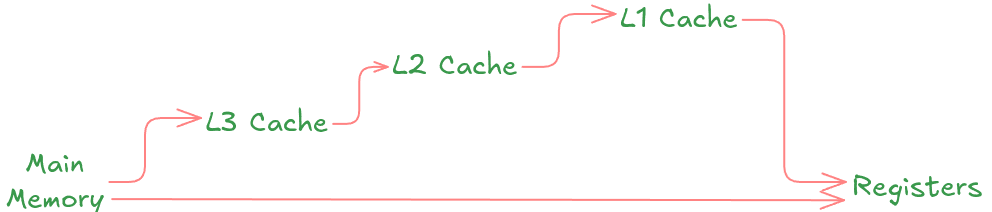
Here, the data can be directly copied from the main memory to the registers while simultaneously copying it to all the Cache Levels.
Each cache is also divided into small pieces called Cache Lines. One write to the cache often atomically updates an entire line. The median instruction size in this system is 1-3 Bytes. But for the sake of simplicity lets assume it is 64 bits i.e. 8 Bytes. Which means, a cache line in L3 Cache will be able to fit 8 instructions at once.
L3 Cache
This is a smart cache shared by all cores. This cache can adapt to any workload and dedicate space to any core if needed. It's 8 MB in total, with 64 Byte Lines, hence, there are 131072 total lines.
L2 Cache
These are dedicated caches, one for each core. It is of 256 KB in size, with the same 64 Byte Line, having 4096 such lines.
L1 Cache
The fastest and closest to CPU. There are 2 separate caches dedicated towards Data & Instructions. 32 KB each, 64 Bytes per line, 512 Lines.
Now that its pretty clear how data is read from the memory, lets move on to a little complex part, i.e. Writes.
What happens when CPU wants to modify the data?
The CPU can independently write data to any of cache level theoretically. While it makes sense to do so, keep in mind that we don't want some levels of cache to have data that is not in sync with other levels, and we also don't want to break Cache Inclusion Policy. Hence we will have to carefully design a protocol which will take care of these concerns.
Write-back
In write-back protocol, the processor just modifies the local cache that the data was read from.
The write to the main memory is postponed until the modified content is about to be replaced by another cache block.
This is the fastest approach, since it has only written it to the nearest cache. Keep in mind that Main Memory and L3 Cache are shared by other CPU cores. So if the data that was modified is also needed by some another core, it will not be able to get the most recent data in time. To avoid this, we implement a protocol that let's us write the data in parallel fashion to all levels.
Write-through
With a write-through caching policy, the processor writes to the cache first and then waits until the data is updated in memory or disk. This ensures data is always consistent between cache and other storage assets. However, it takes longer to write to memory and much longer to write to disk than it does to write to cache, so the processor must wait and often suffer reduced performance as a result.
This policy is slow, but safe.
There are more nuances to these, but its not feasible to explain all of them in one article, hence we keep this topic for another article.
This marks the end of this article. As always, I have put some links in the Further Reading section for you to expand on the knowledge. Check them out !
Further Reading
Footnotes
🗨️ You can just talk to this blog!
Interact with content in a whole new way using custom prompts.