Loop Optimizations
In the past week, we saw the compiler level optimizations that are related to and affected by the volatile keyword in C++. In that, we stumbled upon one of the loop optimization techniques - Loop Optimization. In this week, we will be focusing on Loop Optimizations & various other performance oriented stuff around them.
Loop optimizations is an overwhelming topic in compiler design because it involves many concepts. Not all of them are actually hard to understand if you understand runtime from ground-up. The top-down approach makes it overwhelming. Before we get going, if you haven't already kindly read Where do variables sit on runtime ? from my previous article. This article will continue to build on many concepts that were originally introduced in that article.
Lets start one by one -
Loop Fission
lets see this code snippet -
for (int i = 0; i < n; i++) {
    a[i] = b[i] + c[i];
    d[i] = e[i] * f[i];
}
If you pay attention to the code, you may notice that this is exactly same as Code Reordering snippet. Here also the first line of the loop and the second line of the loop are totally independent. The only difference is, this causes much more problems than the example without the loops. Since it is in a loop, this will amplify our problem n-times. Let me state the problem clearly again once. Assume we only have 3 cache registers to store variables (a single element)1.
// iteration 0
a[i] = b[i] + c[i];         // load b[i] & c[i], compute a[i]               100ms
d[i] = e[i] * f[i];         // flush a[i], load e[i] & f[i], compute d[i]   100ms

// iteration 1
a[i] = b[i] + c[i];         // flush d[i], load b[i] & c[i], compute a[i]   100ms
d[i] = e[i] * f[i];         // flush a[i], load e[i] & f[i], compute d[i]   100ms

// iteration 2
a[i] = b[i] + c[i];         // flush d[i], load b[i] & c[i], compute a[i]   100ms
d[i] = e[i] * f[i];         // flush a[i], load e[i] & f[i], compute d[i]   100ms

// iteration n
a[i] = b[i] + c[i];         // flush d[i], load b[i] & c[i], compute a[i]   100ms
d[i] = e[i] * f[i];         // flush a[i], load e[i] & f[i], compute d[i]   100ms
Note
a small intentional oversight - the first line here may actually take multiples of 100ms time. but I am keeping it 100ms just to simplify the demo and to avoid a detour. Its yours to figure out why so!
... and the vicious cycle continues. here, flushing means writing back to the main memory, which takes a significant amount of time (assumed 100ms here) than just writing to the register temporarily and writing back only once when truly needed. Let's see how Loop Fission works -
for (int i = 0; i < n; i++) {
    a[i] = b[i] + c[i];
}
for (int i = 0; i < n; i++) {
    d[i] = e[i] * f[i];
}
If it wasn't obvious already, we will be splitting the loop into two separate loops. This way, the loops will run like this -
// First Loop, all the iterations
a[i] = b[i] + c[i];         // load b[i] & c[i], compute a[i]                       1ms
a[i] = b[i] + c[i];         // compute a[i]                                         1ms
a[i] = b[i] + c[i];         // compute a[i]                                         1ms
a[i] = b[i] + c[i];         // compute a[i]                                         1ms
a[i] = b[i] + c[i];         // compute a[i]                                         1ms
a[i] = b[i] + c[i];         // compute a[i]                                         1ms
a[i] = b[i] + c[i];         // compute a[i]                                         1ms
a[i] = b[i] + c[i];         // compute a[i]                                         1ms
a[i] = b[i] + c[i];         // compute a[i]                                         1ms
a[i] = b[i] + c[i];         // compute a[i]                                         1ms

// Second Loop, all the iterations
d[i] = e[i] * f[i];         // flush all above (3), load e[i], f[i], compute d[i]   100ms
d[i] = e[i] * f[i];         // compute d[i]                                         1ms
d[i] = e[i] * f[i];         // compute d[i]                                         1ms
d[i] = e[i] * f[i];         // compute d[i]                                         1ms
d[i] = e[i] * f[i];         // compute d[i]                                         1ms
d[i] = e[i] * f[i];         // compute d[i]                                         1ms
You can easily see how much of a difference this makes. It's a simple optimization, but has very huge impact.
Loop Fusion
Just the opposite of Loop Fission, as the name suggest. In Fusion we saw that it helps to break down a loop when there are a limited number of registers in cache. Although, there might be two loops which when fused together may not need more cache than we have -
for (int i = 0; i < n; i++) {
    a[i] = 2 + 1;
}

for (int i = 0; i < n; i++) {
    b[i] = 1 * 2;
}
The slight problem here is - Loop overhead. After each and every iteration, the runtime is checking for conditions, and doing the increment. Please note that this overhead becomes significant only when memory-read-write overhead is not there, since that is the more dominant of the two.
Here, the fusion code comes out to be -
for (int i = 0; i < n; i++) {
    a[i] = 2 + 1;
    b[i] = 1 * 2;
}
Its quite obvious that this will only use 2 cache registers. one for a[i] and another for b[i]. And the loop checks will be reduced by half, which is a win.
Loop Interchange
How are matrices stored in memory?
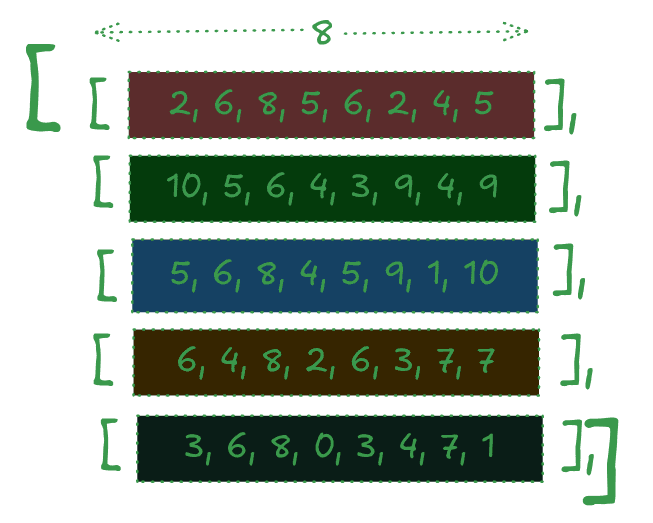
When a matrix is stored inside memory, it is made sure that each of row of the matrix is stored intact, that is in a continuous piece of memory. (this could be a column too, but C++ uses Row-Major Approach)
So each block that you see in the illustration above is stored inside one continuous block of memory. Two different row may be stored very distant from each other, but entire row stays together.
In modern computers, caches can store a chunk of memory instead of just one variable. So when lets say arr[0][0] is needed, the entire array, i.e. arr[0] is loaded into the cache.
Lets see this snippet of code -
for (int i = 0; i < n; i++) {
    for (int j = 0; j < m; j++) {
        a[i][j] *= 2;
    }
}
This code simply doubles each of the element of the matrix. But, if you study closely, you may notice that it asks for elements in a weird and non-optimal way.
The order in which this code asks for elements - a[0][0] a[1][0] a[2][0].... a[0][1] a[1][1] a[2][1]... and so on. When the runtime will ask for a[0][0] we will load the entire a[0] into the cache, but due to the weird access pattern, the runtime will ask for a[1][0] after that, which is not in the cache, so we will have to flush the current cache and then ask for the next one, i.e. a[1]. And this vicious cycle will go on and on.
The compiler employs Loop Interchange to optimize this too -
for (int j = 0; j < m; j++) {
    for (int i = 0; i < n; i++) {
        a[i][j] = i + j;
    }
}
Here, after interchanging the loop levels, we get a nice access pattern - a[0][0] a[0][1] a[0][2]... a[1][0] a[1][1] a[1][2]. Which is the intended function.
Loop Invariant Code Motion
Already explained in The Volatile Keyword. Kindly read there only. Also you may want to read the wikipedia article which has a bunch of advanced concepts.
Loop Tiling/Blocking
Take a look at this code for Matrix Multiplication -
for (int i = 0; i < N; i++) {
    for (int j = 0; j < N; j++) {
        result[i][j] = 0;
        for (int k = 0; k < N; k++) {
            result[i][j] += mat1[i][k] * mat2[k][j];
        }
    }
}
Assume that each matrix is of size 8x8. And suppose we have 8 register caches, which can store 4 adjacent elements of an array. When this code runs, this is what the order of access comes out to be (only considering read operations for the sake of simplicity). -
// FIRST 16 OPERATIONS -
mat1[0][0] && mat2[0][0]
mat1[0][1] && mat2[1][0]
mat1[0][2] && mat2[2][0]
mat1[0][3] && mat2[3][0]
mat1[0][4] && mat2[4][0]
mat1[0][5] && mat2[5][0]
mat1[0][6] && mat2[6][0]
mat1[0][7] && mat2[7][0]
// END OF LOOP inner loop, next iteration of outer loop -
mat1[0][0] && mat2[0][1]
mat1[0][1] && mat2[1][1]
mat1[0][2] && mat2[2][1]
mat1[0][3] && mat2[3][1]
Note
I urge you to checkout the entire code here
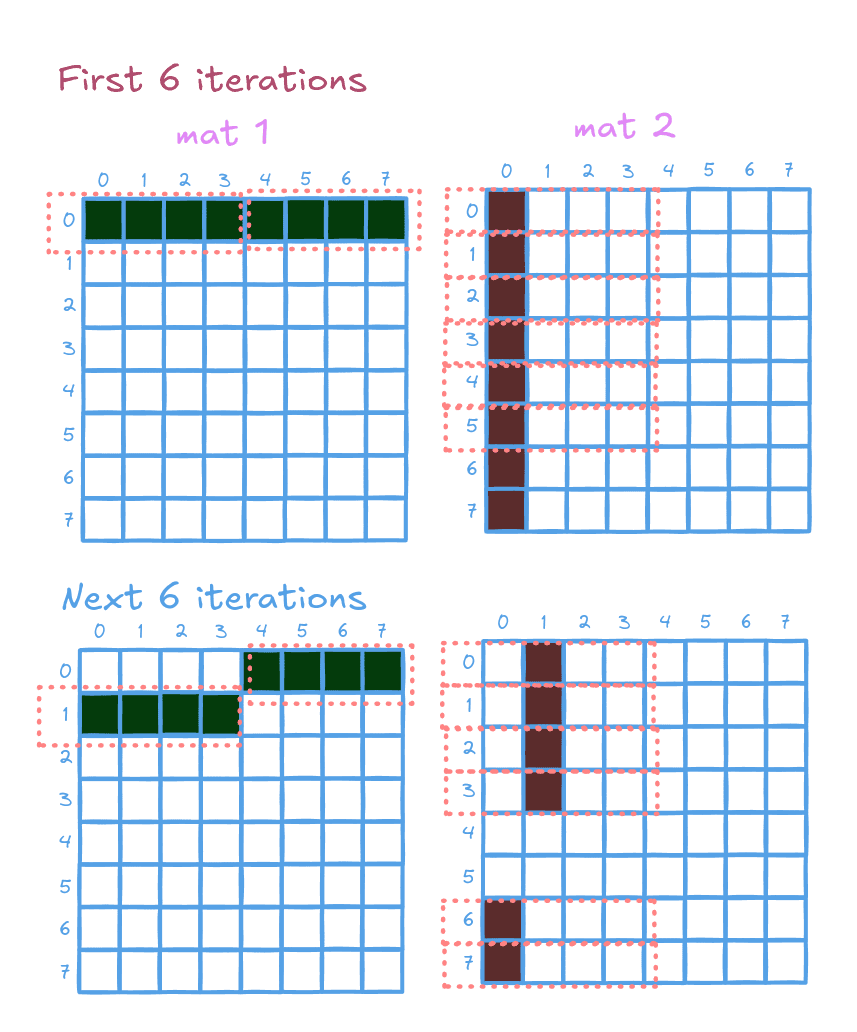
If you observe it carefully, we are loading a lot of data into our cache that we aren't really using. for example we are never reading mat2[2][2], mat2[3][3] and so on... Here's a diagram to visualize this a little better -
Important
Each dotted rectangle represents a cache register, containing 4 neighboring elements of an array. Each cell that is inside the dotted rectangle but isn't colored represents a wasted load from memory. i.e. it was loaded into the cache but was never read.
So now let's look at the optimized version of this code. This one uses Blocking. Rather than getting overwhelmed by the textual description, lets jump straight to code -
for (int jj = 0; jj < N; jj += B) {
    for (int kk = 0; kk < N; kk +=B) {
        for (int i=0; i < N; i++) {
            for (int j=jj; j<min(jj+B, N); j++) {
                int r = 0;
                for (int k=kk; k<min(kk+B, N); k++) {
                    r += mat1[i][k] * mat2[k][j];
                }
                result[i][j] += r;
            }
        }
    }
}
First things first, notice that we have introduced additional for-loops. Which is not a problem because as I have already stated, memory load & write operations are more dominant that loop overheads. If you see the pattern of reading from the matrices now 2 -
mat1[0][0] && mat2[0][0]
mat1[0][1] && mat2[1][0]
mat1[0][2] && mat2[2][0]
mat1[0][3] && mat2[3][0]
====
mat1[0][0] && mat2[0][1]
mat1[0][1] && mat2[1][1]
mat1[0][2] && mat2[2][1]
mat1[0][3] && mat2[3][1]
====
mat1[0][0] && mat2[0][2]
mat1[0][1] && mat2[1][2]
mat1[0][2] && mat2[2][2]
mat1[0][3] && mat2[3][2]
====
mat1[0][0] && mat2[0][3]
mat1[0][1] && mat2[1][3]
mat1[0][2] && mat2[2][3]
mat1[0][3] && mat2[3][3]
====
mat1[1][0] && mat2[0][0]
mat1[1][1] && mat2[1][0]
mat1[1][2] && mat2[2][0]
mat1[1][3] && mat2[3][0]
====
mat1[1][0] && mat2[0][1]
mat1[1][1] && mat2[1][1]
mat1[1][2] && mat2[2][1]
mat1[1][3] && mat2[3][1]
====
// goes on and on...
See full output on Github
If you closely observe, you will notice that it is only reading from a sub-matrix of 4x4. Visualized here -
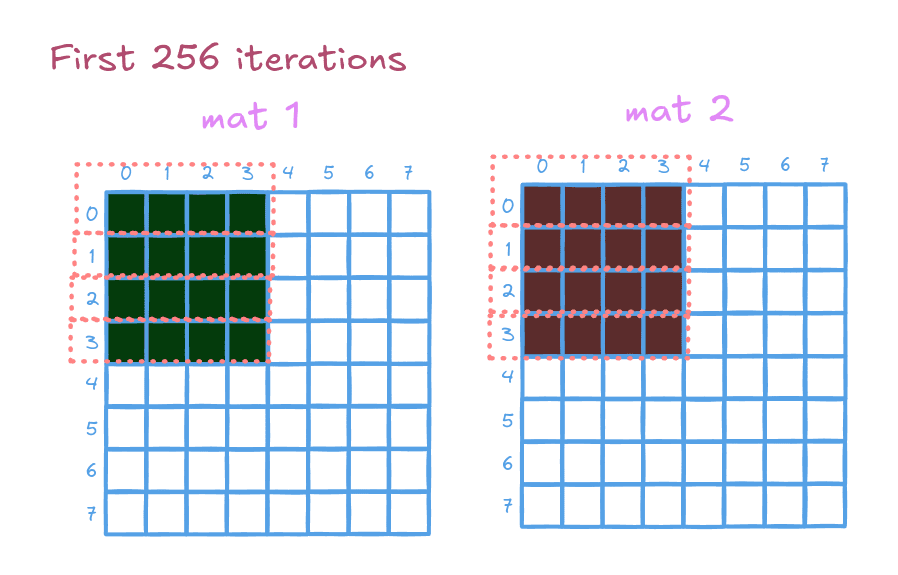 Here, not a single memory read is wasted, and after the initial loading, the runtime doesn't have to load ANY element until 256 (16x16) iterations!!! It performs it so well that every single element that is loaded once, will never have to be loaded again.
It's important to note that this version of matrix multiplication is what powers most of today's 3D engines, Machine Learning algorithms, etc.
This brings us to the end of this article. We have covered 5 of the most important concepts of Loop Optimizations here. But this doesn't end here. Here we have only covered Loop Optimizations that involve caching problems.
There are other problems like Loop Dependencies, CPU stalls, Jump Statements which are solved using a huge load of other Loop Optimization, which we will cover in subsequent articles. For now, head off to the Further Readings section of this article to expand your knowledge on what we learned here.
Further Reading
- Wikipedia - Loop Optimization
- Wikipedia - Cache Hierarchy
- This PPT sums up a lot of Loop Optimizations in a short way
- Wikipedia - Loop Dependence Analysis
- Youtube - Loop Blocking - by Prof. Dr. Ben. H. Juurlink
Footnotes
-
most modern computers have caches that can store a chunk of array rather than just one element. We have introduced this in upcoming examples Loop Interchange, but here we are keeping it this way for the sake of simplicity. ↩
🗨️ You can just talk to this blog!
Interact with content in a whole new way using custom prompts.