Why Is Heap Allocation Slower than Stack Allocation?
Introduction
In C++, Heap memory and Stack memory may seem like just two comparable options for initializing variables with a few tradeoffs of their own. Stack allocation is the sort of considered the "normal" and easier/simpler way of initializing variable, and Heap allocation is an "advanced" concept that is usually taught later in the course.
Tip
There's a 3rd type of memory available to us in C++. Its called static memory. Look it up and try to understand it.
Lets first look at the tradeoffs here -
| Parameter | Stack | Heap |
|---|---|---|
| Deterministic Behaviour | Yes | No |
| Speed | Fast | Slow |
| Is Memory Contiguous | Yes | No |
| Cache Performance | Best | Bad |
| Size Limitations | Yes | No |
| Can be allocated dynamically | No | Yes |
| Garbage Collection | By-Default | Manual |
In this article, we will be particularly focussing on Why is Heap allocation slow?. We will look at operations that are needed while allocating heap memory and we will try to understand them properly. But first, let me demonstrate that heap allocation is indeed slow. For that we take a the following code snippet -
void stackAllocation(std::vector<int>& v) {
    int arr[ARRAY_SIZE];
    for (int i = 0; i < ARRAY_SIZE; ++i) {
        arr[i] = v[i];
    }
    // ...some operations to prevent compiler optimization
}

void heapAllocation(std::vector<int>& v) {
    auto arr = std::make_unique<int[]>(ARRAY_SIZE);
    for (int i = 0; i < ARRAY_SIZE; ++i) {
        arr[i] = v[i];
    }
    // ...some operations to prevent compiler optimization
}
Note that ARRAY_SIZE has been taken ~10000 so that the difference gets observably amplified. When we benchmark this code, we get the result -
Stack allocation time: 164.413 ms
Heap allocation time: 1587.56 ms
Heap allocation is 9.65594 times slower than stack allocation
Heap Allocations takes almost 10x the time same operation takes in normal stack allocation. Now let's dig deeper into "why".
Memory Snapshot & Holes
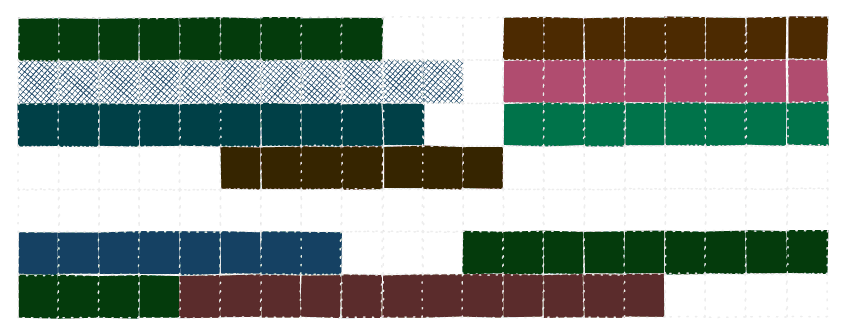
Take a look at this snapshot of the memory. The filled cells represent memory locations that have some data stored in them, and blank cells represent memory cells that free, i.e. available for use. How did we reach this state? Well lets say each of the continuous blank chunk was actually an array and was freed before taking this snapshot.
Note
A little terminology - A blank continuous chunk of memory is called a Hole.
When the programmer asks to allocate the memory, the runtime will have to search for a suitable hole and initialize the variable at that location. Lets say that the programmer asks for a space where he can store 6 integers. Now if we start searching in our memory snapshot, we can easily see that the earliest hole which can fit 6 memory location is in the 4th row, highlighted in this diagram -
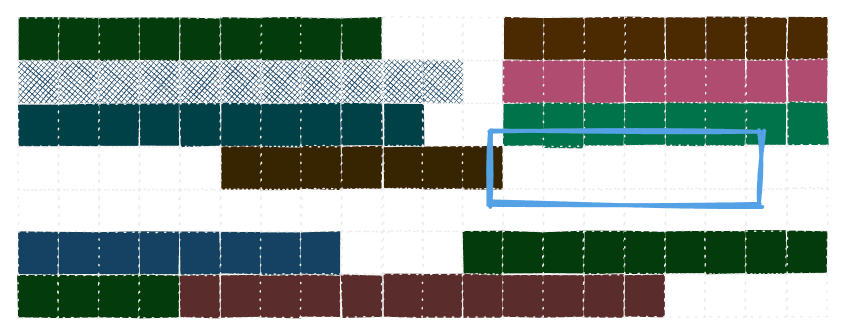
It is impossible to get this search overhead out of the way. The runtime will always need to search for the hole. We can make the search faster by using different data structures to keep track of the hole, but that is for another article.
The obvious question that comes to mind is that How does the stack memory achieve this? Well, yes stack memory also has to deal with the same problem, but it doesnt have to deal with it on the runtime. The compiler optimizes the code since the allocation is not dynamic and the sizes of the memory needed are pre-defined.
After some time, the heap memory may get used a lot, being allocated to various sizes and then eventually being freed. This may lead to numerous small holes in memory such that the total space is big, but continuous available chunk is very small. So the runtime periodically has to take care of this by re-arranging the memory to bring together these scattered holes.
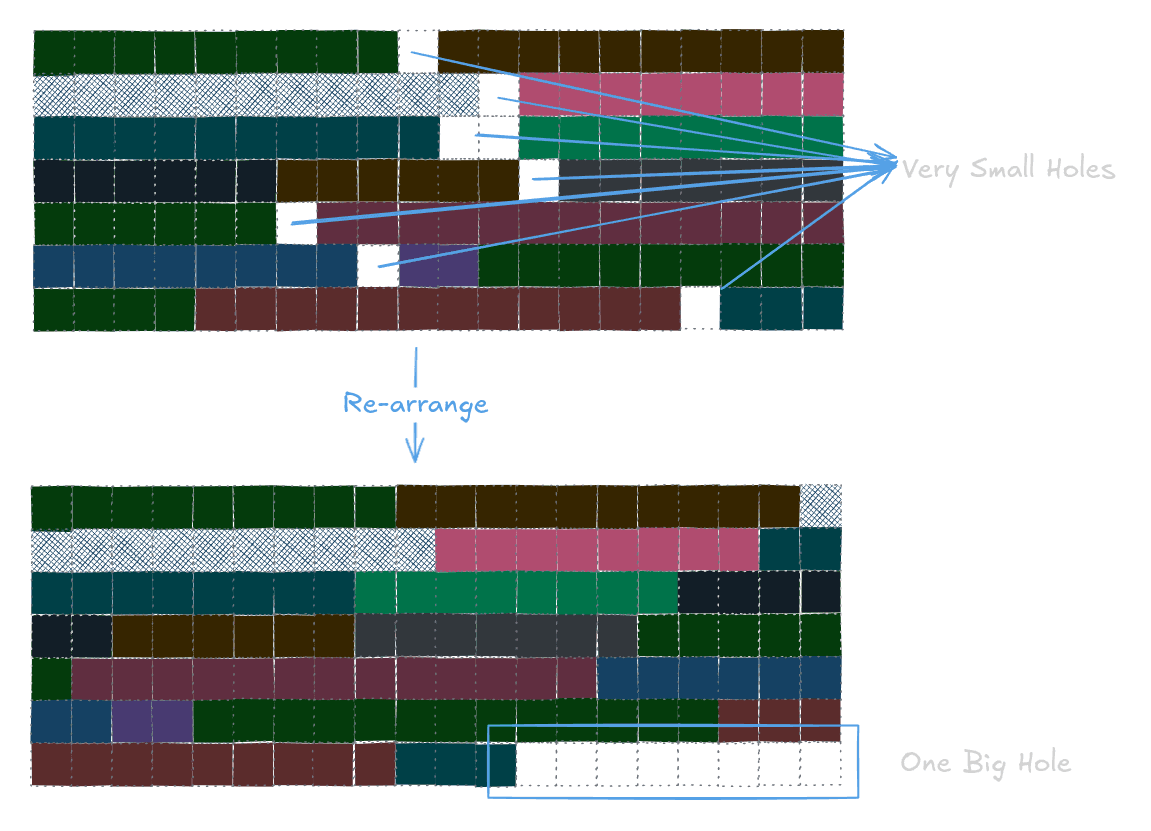
This is re-arranging is a very expensive operation, since we have to read (almost) every byte of memory and rewrite it. The runtime essentially goes through these steps -
- Check for the size of memory required - assume M KB
- Look through memory to check if there is a continuous chunk available.
- If not, take the sum of all holes.
- If the sum is bigger than M, rearrange.
- If the sum is not bigger, ask the Operating System for more memory.
Note
Many actions from the above list can be done in parallel fashion and in more efficient manner, but I have kept it simple for understanding purposes.
The Minute Details - Context Switches
The initially allocated memory to your c++ program is often around 32 KB to 1 MB, depending on the system and the compiler. If a program exceeds that, which it often does, the runtime will have to ask the Operating System to allocate more memory to it.
When a program needs to "ask" the Operating System for something, it has to do it with the means of System Calls. System Calls are an API exposed by the Operating System let any program communicate with it.
In this case, the system call that we are looking at is usually called mmap() or if the system is older, it can be brk() or sbrk(). System Calls itself is a very big topic so we will focus on only the relevant part here - System Calls are expensive.
Here is a breakdown of what really goes down behind a system call -
- Raising an interrupt - Operating System detects a system call, and asks the CPU to halt current process.
- A context switch - CPU halts the current running program, which essentially means taking all the cache and register data, and saving it to the memory to resume operation later.
- Interrupt Service Routine - a special program that comes in to detect the operation to be done for a system call.
- The ISR understands the system call, checks if the parameters passed are legal and valid.
- ISR performs the actual requested action.
- Context Switch - back to the original program, again copying all the values and loading into caches, registers, etc.
This procedure alone takes a lot of time and since the requested action is only the 5th step, most of the other time consumed here is overhead.
This marks the end of this article. This one was a bit of a introductory article, with lots of rabbit holes left unexplored. Anticipate a lot of memory & heap related articles in the future.
Note
No "Further Reading" section for this one, since this one was too superficial and I intend explain things further by myself.
🗨️ You can just talk to this blog!
Interact with content in a whole new way using custom prompts.